Plotly是一个多功能的库,提供了全面的资源来进行数据可视化。它的能力可以根据用户的需求定制图表,因此深受许多分析师和数据爱好者的喜爱。
在最近的一个使用案例中,我想将印度数字系统的符号加入到我的Plotly图表中。具体来说,我想用更具文化相关性的“Lacs”和“Crores”来取代传统的“Millions”和“Billions”。虽然Plotly没有直接提供此功能,但我发现了一种通过自定义图表属性来实现目标的方法。

在创建图表时,我利用了列表推导式在线图中的“hovertemplate”属性。这涉及将输入数字分为四个不同的组:“Crores”、“Lacs”、“K”(千)或数字本身。为了实现这种分类,我依赖了一个基本但基础的属性——字符串格式化输入数字的长度。
让我们通过一个例子来说明这一点。我们首先生成一个随机数据,用于分析一个品牌在30天内根据支出以卢比(₹)为基础的销售业绩。
import numpy as npimport pandas as pdimport plotly.graph_objects as gonp.random.seed(66)df = pd.DataFrame( { 'Spends': sorted(np.random.randint(1000000, 5000000, 30)), 'Sales': sorted(np.random.randint(1000000, 4000000, 30)) })df.head(3)生成的数据如下所示:
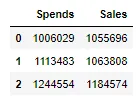
请注意,我们还对输入的支出和销售数据进行了排序,以获得接近线性的图表,以使我们的示例更有见地。
接下来,我们需要根据这些字符串格式化数字的长度对这些支出和销售金额进行分类。
if len(str(min(df['Spends']))) >= 8 or len(str(max(df['Spends']))) >= 8: unit = ' Cr.' df['Spends'] = df['Spends'].apply(lambda x: round(x/pow(10, 7), 2)) elif (len(str(min(df['Spends']))) >= 6 and len(str(min(df['Spends']))) < 8) or (len(str(max(df['Spends']))) >= 6 and len(str(max(df['Spends']))) < 8): unit = ' Lacs' df['Spends'] = df['Spends'].apply(lambda x: round(x/pow(10, 5), 2)) elif (len(str(min(df['Spends']))) > 3 and len(str(min(df['Spends']))) <= 5) or (len(str(max(df['Spends']))) > 3 and len(str(max(df['Spends']))) <= 5): unit = ' K' df['Spends'] = df['Spends'].apply(lambda x: round(x/pow(10, 3), 2)) else: unit = ''在这里,我们对支出列的最小值和最大值引入了特定的条件。如果支出列的任一端满足这些条件,则分配“unit”变量的值。这些条件还包括通过不同的十倍数将支出列除以。这确保了将值转换为Crores(10⁷)、Lacs(10⁵)或Thousands(10³),并有助于设置满足我们目标的轴刻度。
类似地,我们也对销售列进行了单位的派生和数字的格式化:
if len(str(min(df['Sales']))) >= 8 or len(str(max(df['Sales']))) >= 8: unit2 = ' Cr.' df['Sales'] = df['Sales'].apply(lambda x: round(x/pow(10, 7), 2)) elif (len(str(min(df['Sales']))) >= 6 and len(str(min(df['Sales']))) < 8) or (len(str(max(df['Sales']))) >= 6 and len(str(max(df['Sales']))) < 8): unit2 = ' Lacs' df['Sales'] = df['Sales'].apply(lambda x: round(x/pow(10, 5), 2)) elif (len(str(min(df['Sales']))) > 3 and len(str(min(df['Sales']))) <= 5) or (len(str(max(df['Sales']))) > 3 and len(str(max(df['Sales']))) <= 5): unit2 = ' K' df['Sales'] = df['Sales'].apply(lambda x: round(x/pow(10, 3), 2)) else: unit2 = ''现在,是时候创建图表了:
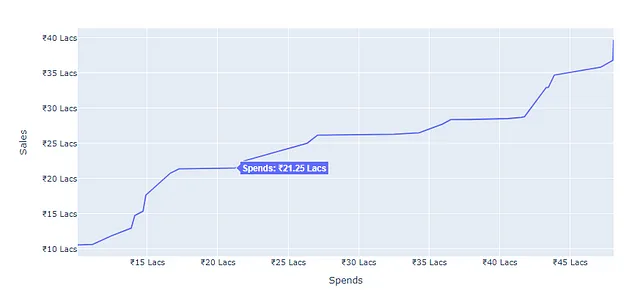
fig = go.Figure()fig.add_trace( go.Scatter( x = df['Spends'], y = df['Sales'], mode = 'lines', hovertemplate = [ '<b>' + 'Spends: ₹' + str(spends) + unit + '<extra></extra>' for spends in df['Spends'] ], ))在‘hovertemplate’中,我们使用了列表推导,它会遍历整个‘Spends’列,并在数字前加上卢比符号(₹)。同时,它还添加了我们在前一步中得到的单位变量。
最后,我们会通过为图表的刻度添加前缀和后缀来格式化坐标轴。在这里,通过十亿、千万或千来划分数字将在获得适当的刻度方面起到关键作用。
fig.update_xaxes(title = 'Spends', tickprefix = '₹', ticksuffix = unit)fig.update_yaxes(title = 'Sales', tickprefix = '₹', ticksuffix = unit2)fig.show()这将得到以下图表:
完整代码
import pandas as pdimport plotly.graph_objects as goimport numpy as np# 为了可重现性,设置一个种子np.random.seed(66)# 创建包含 'Spends' 和 'Sales' 随机数据的 DataFramedf = pd.DataFrame( { 'Spends': sorted(np.random.randint(1000000, 5000000, 30)), 'Sales': sorted(np.random.randint(1000000, 4000000, 30)) })# 根据 'Spends' 的范围确定适当的单位和除数if len(str(min(df['Spends']))) >= 8 or len(str(max(df['Spends']))) >= 8: unit = ' 十亿' df['Spends'] = df['Spends'].apply(lambda x: round(x/pow(10, 7), 2)) elif (len(str(min(df['Spends']))) >= 6 and len(str(min(df['Spends']))) < 8) or (len(str(max(df['Spends']))) >= 6 and len(str(max(df['Spends']))) < 8): unit = ' 百万' df['Spends'] = df['Spends'].apply(lambda x: round(x/pow(10, 5), 2)) elif (len(str(min(df['Spends']))) > 3 and len(str(min(df['Spends']))) <= 5) or (len(str(max(df['Spends']))) > 3 and len(str(max(df['Spends']))) <= 5): unit = ' 千' df['Spends'] = df['Spends'].apply(lambda x: round(x/pow(10, 3), 2)) else: unit = ''# 根据 'Sales' 的范围确定适当的单位和除数if len(str(min(df['Sales']))) >= 8 or len(str(max(df['Sales']))) >= 8: unit2 = ' 十亿' df['Sales'] = df['Sales'].apply(lambda x: round(x/pow(10, 7), 2)) elif (len(str(min(df['Sales']))) >= 6 and len(str(min(df['Sales']))) < 8) or (len(str(max(df['Sales']))) >= 6 and len(str(max(df['Sales']))) < 8): unit2 = ' 百万' df['Sales'] = df['Sales'].apply(lambda x: round(x/pow(10, 5), 2)) elif (len(str(min(df['Sales']))) > 3 and len(str(min(df['Sales']))) <= 5) or (len(str(max(df['Sales']))) > 3 and len(str(max(df['Sales']))) <= 5): unit2 = ' 千' df['Sales'] = df['Sales'].apply(lambda x: round(x/pow(10, 3), 2)) else: unit2 = ''# 创建包含 'lines' 模式的 Scatter 图表fig = go.Figure()fig.add_trace( go.Scatter( x = df['Spends'], y = df['Sales'], mode = 'lines', hovertemplate = [ '<b>' + 'Spends: ₹' + str(spends) + unit + '<extra></extra>' for spends in df['Spends'] ], ))# 更新 X 轴和 Y 轴的标签、前缀和后缀fig.update_xaxes(title = 'Spends', tickprefix = '₹', ticksuffix = unit)fig.update_yaxes(title = 'Sales', tickprefix = '₹', ticksuffix = unit2)# 显示图表fig.show()因此,这种方法使我们能够将印度数字系统的细微差别整合到我们的Plotly图表中。我们利用了千位、十万位和亿位的表示法的力量,为我们的可视化作品增添了一丝文化背景。通过深入研究额外的条件,我们可以创造出更多样化的表示法,丰富数据可视化的叙述。